
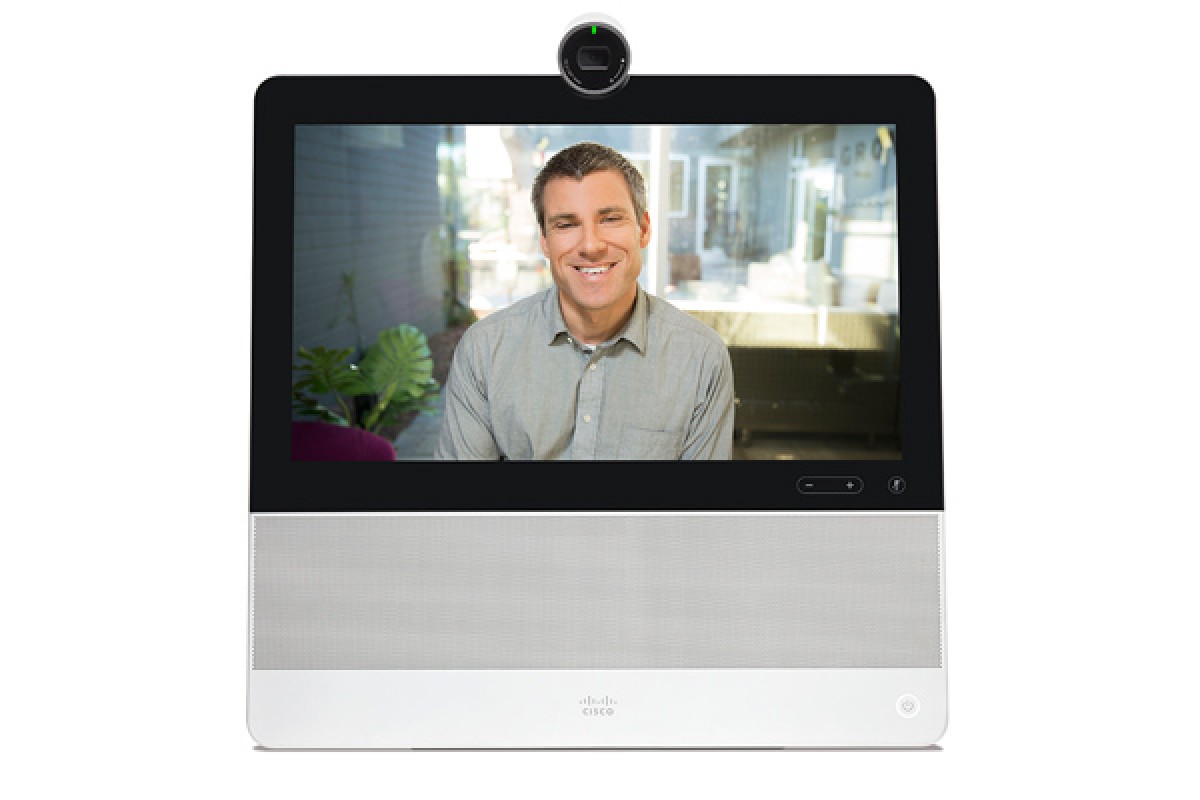
? Dedicated, always-on 1080p High-Definition video communication system
? Fully-featured IP Phone що registers to Cisco UCM call control
? High-quality audio system for speakerphone and media playback
? 14-inch 16:9 screen provides an engaging experience for video calls and running apps
? Multi-touch capacitive touchscreen дає змогу elegant and and powerful user interface
? Security Enhanced Android операційний system combined with Cisco's end-to-end security features gives peace of mind to network administrators
? Cisco Extension Mobility supports multiple profiles allowing hot-desking and shared workspaces
? Малі options до індивідуальності вашої практики і maximize продуктивності; з wallpapers, widgets, та ручки, щоб скористатися можливостями для використання Bluetooth і USB accessories
? Self-provisioning device is simple for users для отримання з box and start using quickly
? Native Cisco AnyConnect VPN здійснює підключення до робочого місця з office a snap
Features and Benefits
Features and Benefits
Feature | Benefit |
Design features | • Install in minutes: The DX70 є увімкненим пристроєм з усіма дисплеями. Just plug in the power cable and Ethernet cable (or use Wi-Fi). З self-provisioning your device буде register itself. Authenticate to complete the setup. • High-Definition Video: З 1920x1080 14-inch screen, на 8MP камери, і кращі class video compression, the DX70 дає змогу engaging experiences. • High-performance audio and acoustics system, Excellent for multi-media playback. • Touchscreen interface: The multi-touch capacitive touchscreen overlay забезпечується простим іefficient user interface. • All controls on screen: Calls може бути легко placed from the screen itself. Там не потрібно для зовнішнього пристрою. Options є також accessible while on a call to ensure the participants can stay engaged during a conversation. • Document camera: The camera housing on top of DX70 може бути tilted down to allow sharing of physical content and drawings. • Inclinable screen: As it is also tablet capable of running applications, the DX70 accommodates users who want to sit and use the device comfortably at the the desk. Штамп аркуш є легко встановлений за допомогою користувача і забезпечує useable range of 20-degrees and 85-degrees above the desktop. |
Application features | • Share multimedia and presentation at Touch of button: while on call the DX70 allows the user to see their laptop or desktop PC/Mac screen and share it instantly to other participants on call. • Easy swap між комп'ютером і DX interface: Swap між monitor mode and the DX70 interface за допомогою simple press of “Source” button. • Intelligent Proximity: Натисніть, щоб телефонувати/за допомогою мобільного телефону, використовуючи DX70, а також звуковий hardware і телефонний контроль, як добре sync of Contacts and Call History від мобільного пристрою до DX70. • WebEx і Jabber integred: DX70 працює з Cisco Collaboration applications pre-installed для Instant Messaging, Presence and Web Conferencing. • Compatible with Google Android applications: The DX70 може виконувати будь-який Android application on its large touch screen. |
Performance features | • Сервіси simultaneous HD video and content sharing. • RGB input is compatible with all modern PC and Mac computers. • Audio is communicated through full-duplex, wide-band audio. • Provisioning and self-configuration є легко з Cisco UCM. • Цей система є надійно підтримуваною Cisco UCM версією 8.6 або останнім. |
Product Specifications
Feature | Benefit |
Components | Fully integrated unit including: • Codec • Camera • Display • Microphones and speakerIncluded: Screen cleaning cloth, 2.9m Ethernet cable, and Power Supply unit |
Display | • 14-inch LCD monitor • Resolution: 1920 x 1080 (16:9) • AHVA display technology • Contrast ratio: 700:1 (typ.) • Viewing cone: 89/89/89/89 • Response time: 25ms • Brightness: 300 cd/m2 (5 points avg.) • 10-point multi-touch surface with capacitive sensing |
Supported PC input resolutions | Up to 1080p |
Ergonomic design | • The foot stand is fully retractable для easy transportation • The unit can be easily tilted from anngle of 5° to 70° from the vertical • Camera can be tilted from an angle of -5° to 70° from the display • The main I/O panel includes flip cover to obscure connections |
Audio | • Audio system playback: frequency range: 100Hz - 15kHz, +/-3dB * • Audio system playback: Max рівень: 90dB at 1w/1m * • Optimally tuned and located analog omni-directional microphone *Спеціфікація спирається на пряму оцінку з точки зору субсистеми |
Front camera | 63° horizontal field of view 38° vertical field of view Resolution: 1080p30 F 2.2 Instant Focus заснований на face detection Privacy shutter |
Operating system | Android OS 4.1.1 (Jellybean) |
Processor | TI OMAP 4470 1.5GHz dual-core ARM Cortex-A9 processor |
Storage | 8-GB eMMC NAND Flash memory (embedded multimedia card; nonvolatile) |
Memory | 2-GB RAM; Low Power Double Data Rate Synchronous Dynamic Random-Access Memory (LPDDR2 SDRAM) |
Ports and slots | • High-Definition Multimedia Interface (HDMI) типу Порт для PC або Mac video input • High-Definition Multimedia Interface (HDMI) типу A port output (supports Mirror Mode output) • High-speed USB 2.0 ports: ? Three standard type A ports (for keyboard, mouse, headset, external camera, thumb drive and memory stick connectivity) ? Side-mounted USB port provides high-current (2A) charging. The 2 rear-mounted ports each provide 500mA charging ? One Micro-B USB port (serial port for diagnostic/service use) • Micro Secure Digital Standard Capacity (HDSC) зразок для неможливого зберігання applications або file expansion up to 32GB (standard-definition [SD] card speed Class 4 or later recommended) • One 3.5mm analog headphone/headset jack |
Physical buttons | • Cap sense “source” button to swap between HDMI input and the DX70 interface. Button is lit when HDMI input is connected. • Cap-sense Audio Volume up/down • Cap-sense Audio Mute • Power/Reset/Sleep button |
Visual indicator | • Camera LED indicator (incoming calls, camera activation) • Microphone LED indicator (mute) • Power button LED indicator (power on, sleeping, message waiting, error) • “Source” button (lights when HDMI IN source present) |
Physical dimensions (HxWxD) | 14.84” x 13.91” x 2.45” (377.1mm x 353.1mm x 62.3mm) |
Weight | 7.5 фунтів. (3.4 kg) |
Power | Rated: 3.5A at 12V maximum Low Power Standby mode Integrated EnergyWise support |
Physical security | Kensington Security Lock Slot |
Connectivity | |
Ethernet | • Internal 2-port Cisco Ethernet натисніть для прямого підключення до 10/100/1000BASE-T Ethernet мережі (IEEE802.3i/802.3u/802.3ab) через RJ-45 interface with single LAN connectivity for both a co-located PC/Mac. • Система адміністратора може створювати окремі VLAN (IEEE 802.1Q) для PC та телефону, що забезпечує несприятливі можливості та надійність безпеки та data traffic. |
Desktop Wi-Fi Ethernet | • As an alternative to wired Ethernet, DX70 supports connection to the network via 802.11a/b/g/n Wi-Fi |
Network features | ? Cisco Discovery Protocol • Cisco Peer-to-Peer Distribution Protocol (PPDP) • Session Initiation Protocol (SIP) for signaling ? Session Description Protocol (SDP) ? User Datagram Protocol (UDP) (used тільки для Real-Time Transport Protocol [RTP] streams) ? Dynamic Host Configuration Protocol (DHCP) клієнт або статичне налаштування ? Transparent secure roaming ? Gratuitous Address Resolution Protocol (GARP) • Switch auto-negotiation ? Domain Name System (DNS) ? Web proxy (configured manually or by auto-configuration Protected Access Credential [PAC] files) ? NT LAN Manager (NTLM) та Kerberos authentication • Trivial File Transfer Protocol (TFTP) • Secure Hypertext Transfer Protocol (HTTPS) ? Wi-Fi management ? IPv4 configuration • IPv6 configuration ? Virtual Local Area Network (VLAN) ? Real-Time Control Protocol (RTCP) (provides quality of service [QoS] data [such as jitter, latency, and round-trip delay] ? на RTP streams in order to provide a better video experience) • Secure Real-Time Transport Protocol (SRTP) ? Software port speed (за замовчуванням або auto-configuration, including disablement) ? PC port speed (manual or auto-configuration, including disablement) |
Bluetooth | Bluetooth 3.0 Enhanced Data Rate (EDR) Class 2 technology (up to 30-ft [10m] range) ? Human Interface Device (HID) keyboard and mouse support for adding additional input accessories ? Hands-Free Profile (HFP) для untethered headset connections and voice communications ? Phone Book Access Profile (PBAP), які задовольняють обмін фоном book objects між пристроями ? Advanced Audio Distribution Profile (A2DP) для streaming audio ? Object Push Profile (OPP) для загального файлу обміну |
Accessories | |
Cisco VESA mounting adapter | Цей опційний обмін adapter replaces the DX70's foot stand and provides mounting points in the two VESA standards (75x75mm and 100x100mm) |
Firmware | |
Version | Synergy 10.2.1 (у часі цього дня) |
Call platform support; provisioning and management | ? Cisco UCM Version 8.6.2, 9.0(1), 9.1(2), 10.0(1) and later ? Cisco Hosted Collaboration Solution (HCS) Version 8.6.2 or later ? Cisco Business Edition 6000 Version 9.1 or later |
Удосконалення процесів | ? Software upgrade of the device через Cisco UCM ? Support for online firmware upgrades using TFTP ? HTTP firmware management |
Temperature range | |
Operating temperature | • 32 to 104°F (0 to 40°C) |
Relative humidity | • 10 to 90% (non condensing) |
Storage temperature | • -4 to 140°F (-20 to +60°C) |
Approvals and compliance | |
| ? Directive 2006/95/EC (Low-Voltage Directive) - Standard EN 60950-1 ? Directive 2004/108/EC (EMC Directive) - Standard EN 55022, Class B - Standard EN 55024 - Standard EN 61000-3-2/-3-3 ? Compliance with ETSI EN 301489, ETSI EN 300328, ETSI EN 301893 ? Directive 2011/65/EU (RoHS), Directive 2009/125/EC (ErP), Directive 2002/96/EC (WEEE) ? Призначений для UL 60950-1 and CNA/CSA C22.2 No. 60950-1-07 ? Compliance with FCC CFR 47 Part 15 Class B • Compliance with CFR 47 Part 15.247, CFR 47 Part 15.407, 47 CFR Part 2.1093 FCC Applicable KDB’s |
Video and Audio Specifications
Feature | Specifications |
Video standards | H.264 and AVC (H.264/MPEG-4 Part 10 Advanced Video Coding) |
Minimum bandwidth for resolution and frame rate | Main video at 30 frames per second • CIF (352 x 288 pixels) - 17kbps • VGA (640 x 480 pixels) - 400kbps • 240p (432 x 240 pixels) - 17 kbps • 360p (640 x 360 pixels) - 300kbps • 480p (848 x 480 pixels) - 600kbps • WSVGA (1024 x 600 pixels) - 800kbps • HD 720p (1280 x 720 pixels) - 1300kbps • HD1080p (1920 x 1080 pixels) - 2000kbpsContent channel at 5 frames per second • CIF (352 x 288 pixels) - 17kbps • VGA (640 x 480 pixels) - 200kbps • 240p (432 x 240 pixels) - 17 kbps • 360p (640 x 360 pixels) - 150kbps • 480p (848 x 480 pixels) - 200kbps • WSVGA (1024 x 600 pixels) - 300kbps • HD 720p (1280 x 720 pixels) - 500kbps • HD1080p (1920 x 1080 pixels) - 700kbps |
Frame or picture format | • CIF (352 x 288 pixels) • VGA (640 x 480 pixels) • 240p (432 x 240 pixels) • 360p (640 x 360 pixels) • 480p (848 x 480 pixels) • WSVGA (1024 x 600 pixels) • HD 720p (1280 x 720 pixels) • HD1080p (1920 x 1080 pixels) |
Video features | • Веб-країна контроль за відео та творіння • Self-View |
Supported HDMI input resolutions | Supports formats up to maximum 1920 x 1080 @ 60 fps (HD1080p60), включаючи: • 640 x 480 @ 60 fps • 1280 x 720 @ 60 fps • 1920 x 1080 @30 fps • 1920 x 1080 @60 fpsHigh-definition inputs use progressive video formats |
Audio standards | • Narrowband audio compression codecs: G.711a, G.711u, G.729a, G.729ab, і Internet Low Bitrate Codec (iLBC) • Wideband audio compression codecs: G.722, Internet Speech Audio Codec (iSAC), iLBC, та AAC-LD audio compression codecs. |
In-Call Audio features | • Up to 16kHz sampling rate • 100 Hz - 15 kHz loudspeaker frequency response • Automatic static noise reduction • Acoustic echo cancellers • Automatic Gain Control (AGC) • Active lip synchronization |
Dual stream | • Binary Floor Control Protocol (BFCP) (SIP) dual stream • Supports resolutions up to 1080p (1920 x 1080) |
Table 4. Software Features
Feature | Specifications |
Android core features | • Fully customizable Cisco Launcher and App Tray “Home Screen” enables you to place your own application shortcuts, widgets, and folders • Home screen supports up to five separate screen views or pages, each with a 6 x 5 icon grid • Landscape-orientated applications are supported • On-screen keyboard is supported |
Android bundled applications and widgets | • Calculator • Calendar • Camera • Clock • Contacts • Direct Dial • Email ? Internet Message Access Protocol (IMAP) ? Post Office Protocol 3 (POP3) ? Microsoft Exchange ActiveSync • Favorites • Gallery • Phone features (для прикладу, Forward All, Privacy, Do Not Disturb, Mobility, і Self-View) • Wallpapers (including Live Wallpapers) • Web browser |
Google bundled applications | • Google Play (за допомогою CMC UCM; адміністрування за допомогою Google mobile services applications) • Gmail • Google settings • Maps • Play Books • Play Magazines • Play Movies • Play Music • Google Now |
Cisco bundled applications | • Cisco AnyConnect ® Secure Mobility Client (VPN) • Cisco Jabber IM (which offers chat and presence capabilities) • Cisco WebEx • Quick Contact Badge (можливо, щоб ви легко збираєтеся з вашими повідомленнями на місце, електронна пошта, send an instant message (IM), або запустити WebEx ® meeting) • Visual Voicemail |
Intelligent proximity | • Contact synchronization with Bluetooth-paired, Android або iOS мобільний телефон, що підтримує PBAP • Call history synchronization to view placed or missed calls from mobile device on the DX70 • Audio path routing sends audio через DX70 для мобільного device-connected call |
Configuration modes | • Enhanced, fully-functional mode, що здатні до всіх аспектів телефону, включаючи applications and accounts • Simple mode that hides applications, accounts and provides only voice and video call capabilities` • Public mode based on Simple mode with restrictions on user settings modifications. |
Application deployment options and management | • The administrator може запустити any and all applications from being downloaded on the Cisco DX650/70/80. Спеціально, адміністратор може configure the DX650/70/80 до prohibit the installation of any third-party Android applications. • Google Play access can be administratively disabled (default). Applications from “unknown sources” can be administratively disabled (default): ? Основник может optionally install applications за допомогою Cisco Unified Communications Manager with APK файл. ? Company Photo Directory (здатність до набору та з'єднання photo directory URL image location associated with respective user) ? Company Photo Directory. |
Будівництво і освіта навчання | • Setup Assistant wizard (helps configure email, Jabber IM, WebEx, and Voice Mail account settings) |
Third party application development | Cisco Collaboration application programming interfaces (API) через Software Developer Kit (SDK) |
Language support | • Arabic, Egypt (ar_EG) • Bulgarian, Bulgaria (bg_BG) • Catalan, Spain (ca_ES) • Chinese, PRC (zh_CN) • Chinese, Taiwan (zh_TW) • Croatian, Croatia (hr_HR) • Czech, Czech Republic (cs_CZ) • Danish, Denmark (da_DK) • Dutch, Netherlands (nl_NL) • English, Britain (en_GB) • English, United States (en_US) • Finnish, Finland (fi_FI) • French, France (fr_FR) • German, Німеччина (de_DE) • Greek, Greece (el_GR) • Hebrew, Israel (he_IL) • Hungarian, Hungary (hu_HU) • Italian, Italy (it_IT) • Japanese (ja_JP) • Korean (ko_KR) • Latvian, Latvia (lv_LV) • Lithuanian, Lithuania (lt_LT) • Norwegian bokmål, Norway (nb_NO) • Polish (pl_PL) • Portuguese, Brazil (pt_BR) • Portuguese, Portugal (pt_PT) • Romanian, Romania (ro_RO) • Russian (ru_RU) • Serbian, Republic of Serbia (sr_RS) • Slovak, Slovakia (sk_SK) • Slovenian, Slovenia (sl_SI) • Spanish, Spain (es_ES) • Swedish, Sweden (sv_SE) • Тай, Thailand (th_TH) • Turkish, Turkey (tr_TR) |
Calling feature support | • + Dialing (ITU E.164) • Abbreviated dialing • Adjustable ringing and volume levels • Adjustable display brightness • Auto-answer • Auto-detection of headset • Barge (cBarge) • Callback • Call Chaperone • Call forward • Call forward notification • Call history lists • Call park (включаючи Directed Call Park and Assisted Directed Call Park) • Call pickup • Call timer • Call waiting • Caller ID • Corporate directory • Conference (ad hoc) • Direct transfer • Divert (iDivert) • Do Not Disturb (DND) • Extension Mobility service • Fast-dial service • Forced access codes and client matter codes • Group call pickup • Hold (and Resume) • Intercom • International call logging • IP Phone Manager Assistant (IPMA) • Join (ad hoc) • Last-number redial (LNR) • Malicious-caller ID • Message-waiting indicator (MWI) • Meet-me conference • Mobility (Mobile Connect and Mobile Voice Access) • Music on hold (MoH) • Mute (audio and video) • Network profiles (automatic) • On- and off-network distinctive ringing • Personal directory • PickUp • Predialing before sending • Privacy • Private Line Automated Ringdown (PLAR) • Ring tone per line appearance • Self-View (video call) • Service URL • Shared line(s) • Time and date display • Transfer (ad hoc) • Visual Voicemail • Voicemail |
Emergency services | Emergency Calling Service dialing |
Accessibility features | Additional accessibility features for vision impaired, blind, and hearing and mobility impaired include user-defined and customizable: • Display font size and screen brightness settings • Touchscreen customizable touch and hold delay • Talkback audio prompts and spoken password • Support for Explore by Touch features |
Security features | |
Hardware | • Secure boot • Secure credential storage • Device authentication • File authentication and encryption • Image authentication and encryption • Signaling authentication • Random bit generation • Hardware cryptographic acceleration • Encrypted configuration files • Encrypted file system |
Certificate management | • Certificate Authority Proxy Function (CAPF) support for additional security • Manufacturer-Installed Certificates (MIC) • Locally Significant Certificates (LSC) • X.509 Digital Certificates (DER encoded binary); both DER and Base-64 формати є прийнятними для клієнтів і серверів certificates; certificates with a key size of 1024, 2048, and 4096є supported |
Network | • Wired: 802.1x supplicant options for network authentication use: ? Extensible Authentication Protocol: Extensible Authentication Protocol-Flexible Authentication via Secure Tunneling ? (EAP-FAST) ? Extensible Authentication Protocol: EAP Transport Layer Security (EAP-TLS) ? Extensible Authentication Protocol: EAP Message Digest Algorithm 5 (EAP-MD5) • Wireless:? (refer to Table 5) • Wireless: Wi-Fi Protected Access 2 (WPA2) (EAP-FAST) • Wireless Equivalent Privacy (WEP) • EAP-TLS • Protected Extensible Authentication Protocol - Generic Token Card (PEAP-GTC) |
Media and data signaling | • TLS • SRTP • HTTPS for clients |
Enterprise access | • Cisco AnyConnect Secure Mobility Client • Web Proxy (замовлення або автоматична configuration of Protected) • Access Credential [PAC] files) • NTLM and Kerberos authentication |
Device management | • Remote wipe • ActiveSync remote wipe (email, contacts, calendar, etc.) • Self-service wipe • Wipe after unsuccessful login attempts • Factory reset |
Policy management | • Password complexity • Disable USB • Disable Speakerphone • Disable Headset • Secure Digital I/O (SDIO) enable/disable • Bluetooth • Wi-Fi • Access to Android market • Screen Lock and Automatic Lock (PIN або password) device • Android Debug Bridge (ADB) |
Diagnostics | • Інтегрований Cisco Collaboration Problem Report Tool може отримати інформацію безпосередньо до вашої системи адміністратора, коли ви маєте проблеми з вашим телефоном або застосуванням (відповідно до configured email account) • Log Server |
Wi-Fi Features and Specifications
Feature | Specifications | |||
Protocols | IEEE 802.11a, 802.11b, 802.11g, 802.11n | |||
Frequency bands and operating channels | • 2.412 - 2.472 GHz (channels 1 - 13) • 5.180 - 5.240 GHz (channels 36 - 48) • 5.260 - 5.320 GHz (channels 52 - 64) • 5.500 - 5.700 GHz (channels 100 - 140) • 5.745 - 5.825 GHz (channels 149 - 165) IEEE 802.11d використовується для identify available channels | |||
Non-overlapping channels | • 2.4 GHz (20 MHz channels): up to 3 channels • 5 GHz (20 MHz channels): up to 24 channels • 5 GHz (40 MHz channels): up to 9 channels | |||
Operating modes | • Auto (default), preference to strongest RSSI for 2.4 GHz or 5 GHz • 2.4 GHz only • 5 GHz aonly | Data rates | • 802.11a: 6, 9, 12, 18, 24, 36, 48, 54 Mbps ? 802.11b: 1, 2, 5.5, 11 Mbps • 802.11g: 6, 9, 12, 18, 24, 36, 48, 54 Mbps • 802.11n: HT MCS 0, MCS 1, MCS 2, MCS 3, MCS 4, MCS 5, MCS 6, MCS 7 | |
2.4 GHz receiver sensitivity | IEEE 802.11b: • 1 Mbps: -95 dBm • 2 Mbps: -93 dBm • 5.5 Mbps: -90 dBm • 11 Mbps: -86 dBm | IEEE 802.11g: • 6 Mbps: -89 dBm • 9 Mbps: -89 dBm • 12 Mbps: -87 dBm • 18 Mbps: -85 dBm • 24 Mbps: -81 dBm • 36 Mbps: -78 dBm • 48 Mbps: -74 dBm • 54 Mbps: -72 dBm | IEEE 802.11n HT20: • MCS 0: -88 dBm • MCS 1: -86 dBm • MCS 2: -84 dBm • MCS 3: -81 dBm • MCS 4: -78 dBm • MCS 5: -73 dBm • MCS 6: -71 dBm • MCS 7: -69 dBm | |
5 GHz receiver sensitivity | IEEE 802.11a: • 6 Mbps: -91 dBm • 9 Mbps: -91 dBm • 12 Mbps: -90 dBm • 18 Mbps: -88 dBm • 24 Mbps: -85 dBm • 36 Mbps: -81 dBm • 48 Mbps: -77 dBm • 54 Mbps: -76 dBm | IEEE 802.11n HT20: • MCS 0: -91 dBm • MCS 1: -89 dBm • MCS 2: -86 dBm • MCS 3: -84 dBm • MCS 4: -81 dBm • MCS 5: -76 dBm • MCS 6: -74 dBm • MCS 7: -72 dBm | IEEE 802.11n HT40: • MCS 0: -90 dBm • MCS 1: -87 dBm • MCS 2: -85 dBm • MCS 3: -81 dBm • MCS 4: -78 dBm • MCS 5: -74 dBm • MCS 6: -72 dBm • MCS 7: -70 dBm | |
Transmitter output power | 2.4 GHz: • 802.11b: до 16 dBm • 802.11g: до 16 dBm • 802.11n HT20: до 16 dBm | 5 GHz: • 802.11a: up to 16 dBm • 802.11n HT20: до 15 dBm • 802.11n HT40: до 15 dBm | ||
Antenna | • 2.4 GHz: 2.6 dBi peak gain • 5 GHz: 4.0 dBi peak gain | |||
Access point support | • Cisco Unified Access Points ? Minimum: 7.0.240.0 ? Recommended: 7.4.121.0, 7.6.110.0 or later • Cisco Autonomous Access Points? Minimum: 12.4(21a)JY ? Recommended: 12.4(25d)JA2 or later | |||
Wireless security | Authentication: • Wi-Fi Protected Access (WPA) Versions 1 and 2 Personal and Enterprise • Extensible Authentication Protocol - Flexible Authentication via Secure Tunneling (EAP-FAST) • Protected Extensible Authentication Protocol - Microsoft Challenge Handshake Authentication Protocol Version 2 (PEAP-MSCHAPv2) • Protected Extensible Authentication Protocol - Generic Token Card (PEAP-GTC) • Extensible Authentication Protocol - Transport Layer Security (EAP-TLS) | Encryption: • 40-bit і 128-bit static Wired Equivalent Privacy (WEP) • Temporal Key Integrity Protocol (TKIP) and Message Integrity Check (MIC) • Advanced Encryption Standard (AES) | ||
Fast secure roaming | • Cisco Centralized Key Management (CCKM) | |||
QoS | • IEEE 802.11e and Wi-Fi Multimedia (WMM) • Enhanced Distributed Channel Access (EDCA) • QoS Basic Service Set (QBSS) | |||
Radar detection | Dynamic frequency selection (DFS) and transmit power control (TPC) з урахуванням IEEE 802.11h | |||